

25% off Bloom Email Optin
Hurry! This special offer ends on December 2nd
For a limited time only save 25% off Bloom Email Optin + Exclusive layout packs + Exclusive discounts to several other tools
Shop online at https://saasscout.com/out/elegantbk2019
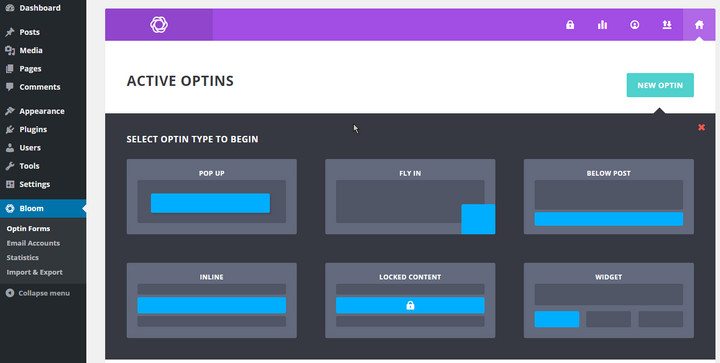 As you can see, the plugin offers six types of optins. They are –
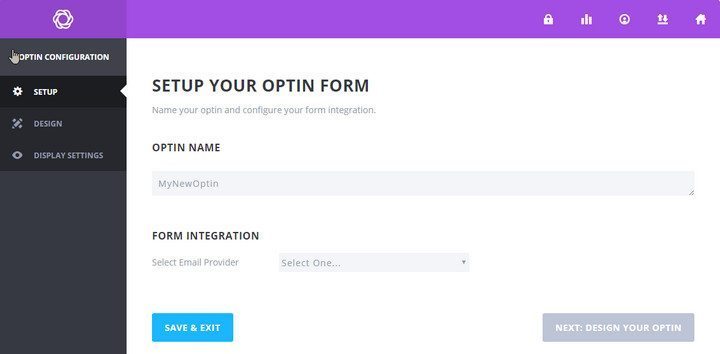 First of all, you can provide a name for the optin. Next, there is the form integration section. Here, you can choose the email marketing service you use. Bloom supports all common email marketing and business management platforms. There is also an option to provide custom HTML code.
Choose your preferred form integration method and connect the account. Then, click the ‘Next’ button to start designing your option.
First of all, you can provide a name for the optin. Next, there is the form integration section. Here, you can choose the email marketing service you use. Bloom supports all common email marketing and business management platforms. There is also an option to provide custom HTML code.
Choose your preferred form integration method and connect the account. Then, click the ‘Next’ button to start designing your option.
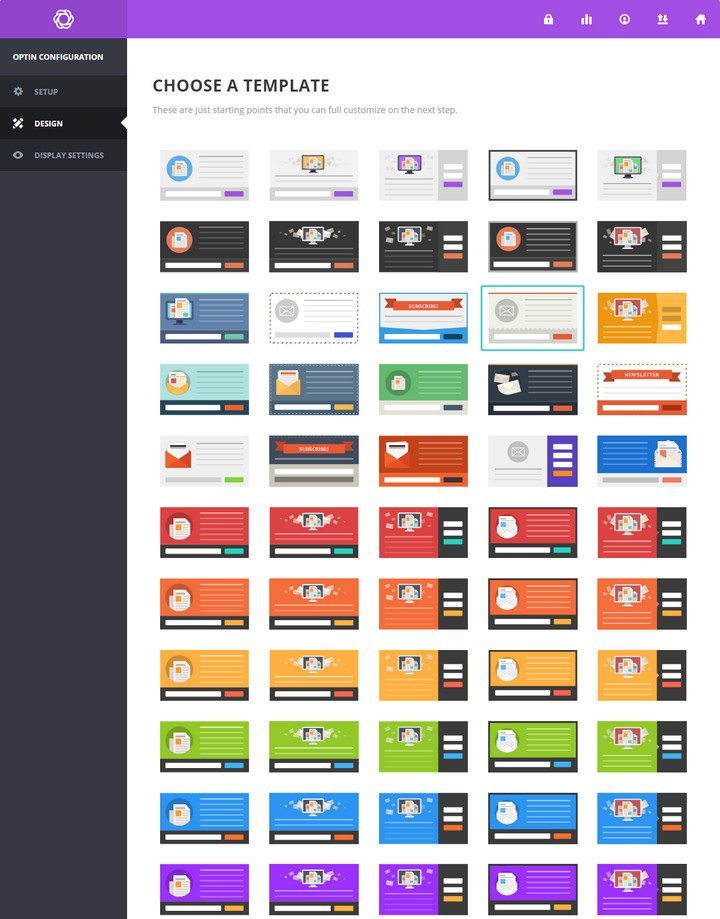 At this point, you will be provided with a list of the available templates. Bloom comes with a lot of readymade templates. Choose the one which suits your requirement and click ‘Next’.
Now that you have chosen the type and template, it is time to customize the design. Bloom offers a diverse range of customizing options for your optins. First of all, there are two separate text areas to provide the title and optin message. You can choose the color, alignment for the text and make them bold or italic too.
Image Settings
Obviously, you can choose a custom image for your optin. What’s more, it is also possible to choose the image orientation. Available orientation options include image above text, below text, left or right of text. There are various options for the image loading animation too. If you want to hide the image in mobile devices, there is a checkbox for that.
Optin Styling
At this point, you will be provided with a list of the available templates. Bloom comes with a lot of readymade templates. Choose the one which suits your requirement and click ‘Next’.
Now that you have chosen the type and template, it is time to customize the design. Bloom offers a diverse range of customizing options for your optins. First of all, there are two separate text areas to provide the title and optin message. You can choose the color, alignment for the text and make them bold or italic too.
Image Settings
Obviously, you can choose a custom image for your optin. What’s more, it is also possible to choose the image orientation. Available orientation options include image above text, below text, left or right of text. There are various options for the image loading animation too. If you want to hide the image in mobile devices, there is a checkbox for that.
Optin Styling
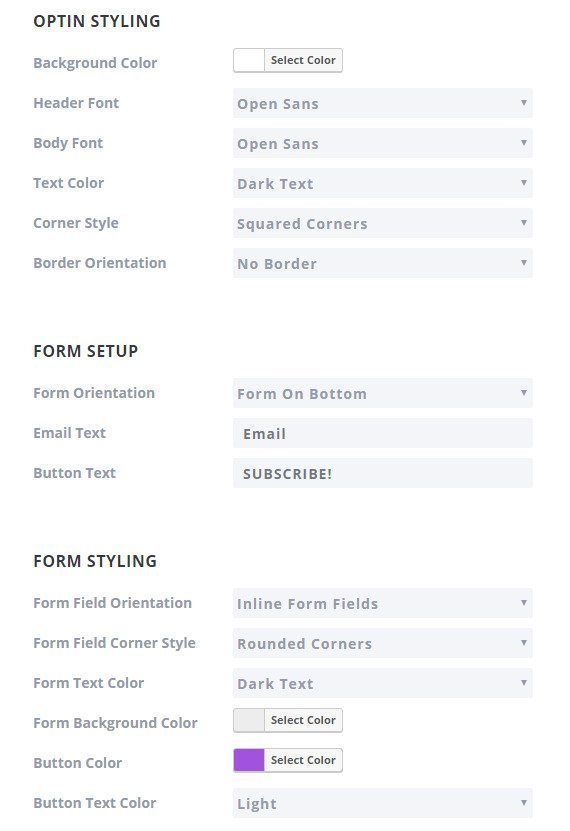 In this section, you can configure the style for the optin. First of all, you can choose the optin background color. Then, there are separate options for choosing the header font, body font, text color, border orientation, etc.
Form Setup
This section enables you to choose the form configuration options. You will find different options for choosing from orientation, email text, and button text.
Other Options
There are several other styling options below. Among them, you will find options for choosing the text color, button color, form background color, form edge style, footer text, success message text, etc. If you want to apply custom styling, the ‘Custom CSS’ box is located towards the end of the page.
Once you have configured the styling options, click the ‘Next’ button.
In this section, you can configure the style for the optin. First of all, you can choose the optin background color. Then, there are separate options for choosing the header font, body font, text color, border orientation, etc.
Form Setup
This section enables you to choose the form configuration options. You will find different options for choosing from orientation, email text, and button text.
Other Options
There are several other styling options below. Among them, you will find options for choosing the text color, button color, form background color, form edge style, footer text, success message text, etc. If you want to apply custom styling, the ‘Custom CSS’ box is located towards the end of the page.
Once you have configured the styling options, click the ‘Next’ button.
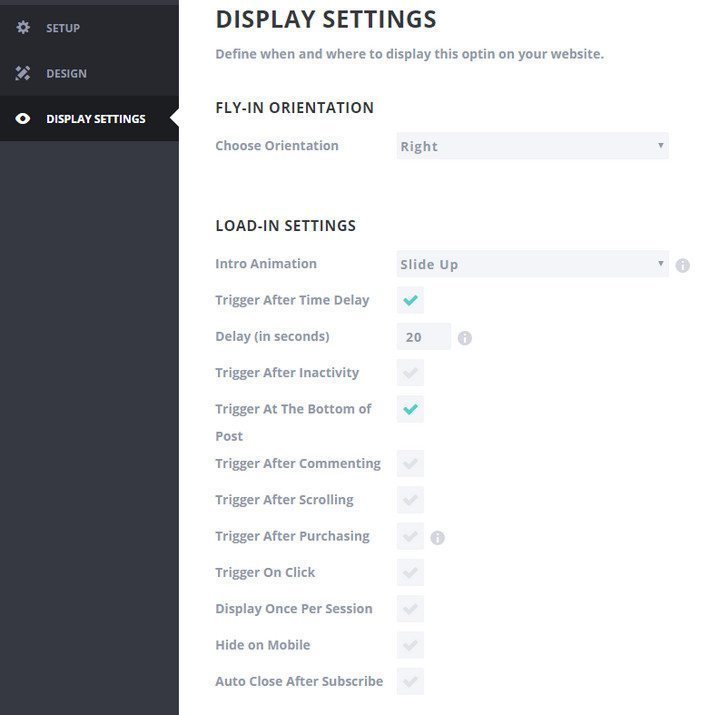 In the ‘Intro Animation’ field, you can choose the animation for the optin. Then, there are various configurable display triggers.
The plugin could be displayed after a specific amount of time, specific period of inactivity, at the bottom of the post, after scrolling a certain percentage of the post, after making a purchase, after leaving a comment, after clicking on a specific element on the page, etc.
You can also choose to display the optin once per session,
In the ‘Intro Animation’ field, you can choose the animation for the optin. Then, there are various configurable display triggers.
The plugin could be displayed after a specific amount of time, specific period of inactivity, at the bottom of the post, after scrolling a certain percentage of the post, after making a purchase, after leaving a comment, after clicking on a specific element on the page, etc.
You can also choose to display the optin once per session, 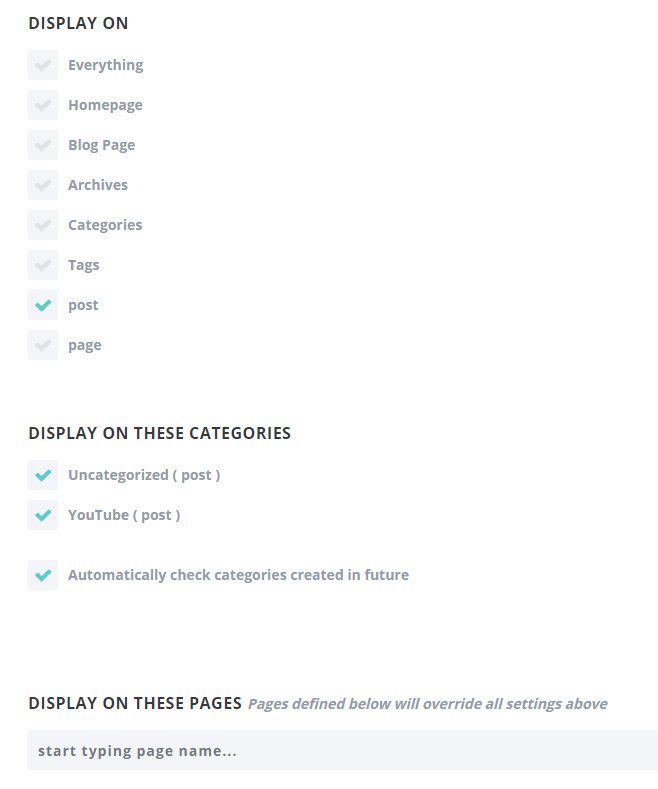 Down the page, you will find the options for choosing where the optin should be displayed. It is possible to display the optin on the whole site, or display in any or all of these locations – the homepage, blog, archive, category pages, tags, posts, and pages.
If you want, you can choose some specific categories for displaying the optin. It is also possible to choose specific posts and/or pages where the optin should be displayed. These will override all the settings configured above.
Once you have made the necessary changes, click ‘Save & Exit’. This will save the optin and take you back to the optin listing page.
Down the page, you will find the options for choosing where the optin should be displayed. It is possible to display the optin on the whole site, or display in any or all of these locations – the homepage, blog, archive, category pages, tags, posts, and pages.
If you want, you can choose some specific categories for displaying the optin. It is also possible to choose specific posts and/or pages where the optin should be displayed. These will override all the settings configured above.
Once you have made the necessary changes, click ‘Save & Exit’. This will save the optin and take you back to the optin listing page.
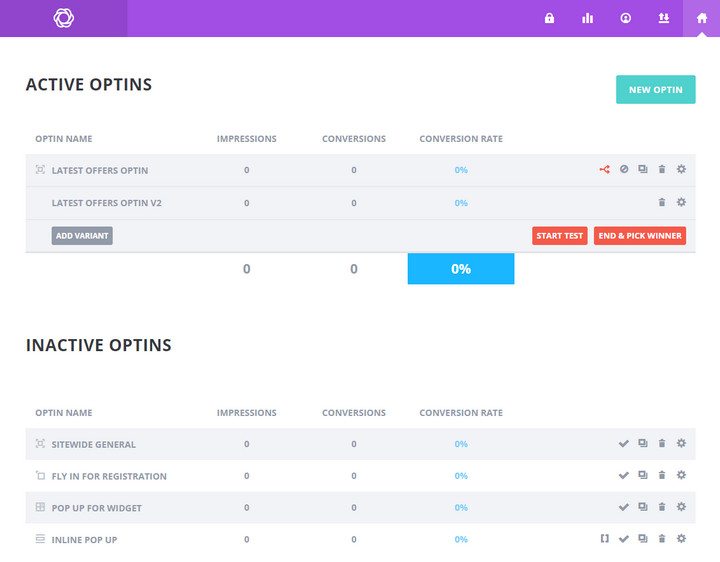 Bloom also supports A/B testing of your active optins. To do that, you have to click the A/B
Testing icon. Then, click ‘ADD VARIANT’. In the next screen, you can make the necessary changes. Click ‘Save & Exit’ once you are done. Finally, click ‘Start Test’ to begin the A/B testing. You can pause or end the testing anytime you want.
Bloom also supports A/B testing of your active optins. To do that, you have to click the A/B
Testing icon. Then, click ‘ADD VARIANT’. In the next screen, you can make the necessary changes. Click ‘Save & Exit’ once you are done. Finally, click ‘Start Test’ to begin the A/B testing. You can pause or end the testing anytime you want.
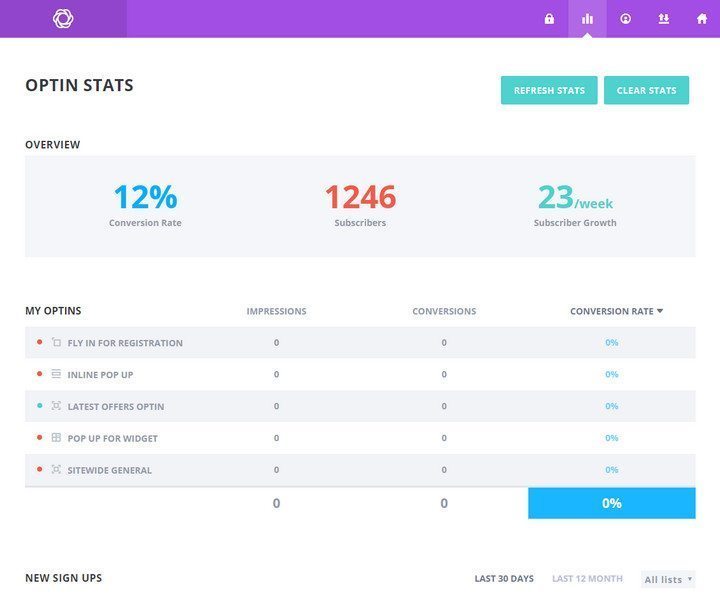 It is also possible to export or import Bloom settings to or from other WordPress sites which are also using Bloom. To do that, go to Bloom > Import & Export. You will find separate options for importing or exporting Blom settings.
Top Bloom Plugin Coupons or Discount codes May 2026
No more coupons for this product
What users are saying:
-
— Brian
Great for beginners to intermediate users
Bloom is great if you are wanting to upgrade from a free or less sophisticated software. You get a wide array of features such as slides, popup, inline and more. For me, the designs are beautiful out... - Read all Bloom Plugin reviews
Bloom Plugin Customer also love these offers
> Event Espresso Coupon Code 2026
> Beaver Builder Coupon Code 2026
> Astra Theme Coupon Code 2026
> BuddyBoss Theme Coupon Code 2026
> OneSocial Theme Coupon Code 2026
> Social Learner Theme Coupon Code 2026
> Social MarketPlace Theme Coupon Code 2026
> Posts Table Pro Coupon Code 2026
> WP Coupons and Deals Coupon Code 2026
> Aelia Currency Switcher Coupon Code 2026
> Canyon Themes Coupon Code 2026
> Useful Links Collections Coupon Code 2026
> Map Markers by mzworks Coupon Code 2026
> GeoDirectory Coupon Code 2026
> OptinMonster Coupon Code 2026
> MemberPress Coupon Code 2026
> WP File Download Coupon Code 2026
> Restrict Content Pro Coupon Code 2026
> TheShop Theme Coupon Code 2026
> MH Magazine Coupon Code 2026
> Rare WordPress Theme Coupon Code 2026
> TeslaThemes Coupon Code 2026
> StudioPress Coupon Code 2026
> MyThemeShop Coupon Code 2026
> iThemes Security Pro Coupon Code 2026
> WP RSS Aggregator Plugin Coupon Code 2026
> wpDataTables Coupon Code 2026
> WP Media Folder Coupon Code 2026
> Weglot translate Plugin Coupon Code 2026
> WP Security Audit Log Coupon Code 2026
> AffiliateWP Coupon Code 2026
> Easy Digital Downloads Coupon Code 2026
> Envira Gallery Coupon Code 2026
> Pretty Link Coupon Code 2026
> UpdraftPlus Backup and Restoration Coupon Code 2026
> Monstroid Theme Coupon Code 2026
> WooCommerce Coupon Code 2026
> Visual Composer Coupon Code 2026
> Hotel Booking Coupon Code 2026
> Smart Slider 3 Coupon Code 2026
> WP User Frontend Coupon Code 2026
> The Events Calendar Coupon Code 2026
> Bloom Plugin Coupon Code 2026
> Elegant Themes Coupon Code 2026
> Monarch Plugin Coupon Code 2026
> ThemeForest Coupon Code 2026
> MemberMouse Coupon Code 2026
> BackupBuddy Coupon Code 2026